Cost to Build a Learning Management System (LMS) for EdTech Startups
Did you know online education is booming — and EdTech startups are leading the charge? Learning Management Systems (LMS) have become the backbone of modern learning, helping schools, businesses, and solo learners build skills anytime, anywhere. With more people craving flexible, personalized education, the LMS market is on track to hit $51.9 billion by 2028. What’s driving it? An increasingly mobile-savvy audience and intelligent AI-driven tools. Along with this, the a rising demand for flexible and self-paced learning experiences.
But here’s the catch: building a custom LMS isn’t cheap, and it shouldn’t be. You’re probably wondering if you’re an EdTech founder or product strategist:
- Should I build my own LMS or buy an off-the-shelf tool?
- How much will it cost to launch a scalable learning platform in 2025?
- What features matter to learners and instructors?
Let’s get the ball rolling together and plan smart and scale fast.
What Is an LMS?
A Learning Management System is a software platform that enables organizations to create and manage content. Along with delivering and tracking educational content. It’s the digital command center where students learn, instructors teach, and administrators track progress, all in one place.
Think of it as Netflix for education, but instead of streaming shows, you’re streaming courses and tracking learned engagement along with enabling certification.
Common Use Cases:
- EdTech startups that are delivering paid or free online courses.
- Schools and universities that are considering hybrid/online classes.
- Corporations incorporating employee onboarding or upskilling programs.
Types of LMS You Might Build:
Your LMS might fall into one of these categories as per your audience:
- Academic LMS – Focused on K-12 schools, colleges, and universities. For e.g., Canvas & Google Classroom..
- Corporate LMS – Built for training employees, customers, or partners. For e.g., Docebo & TalentLMS.
- Hybrid LMS – Designed to serve both student learning and corporate training. For e.g., Moodle with custom extensions.
SaaS LMS vs Custom-Built LMS
| SaaS LMS | Custom-Built LMS |
| Quick setup, lower upfront cost | Full control over features and scalability |
| Limited customization | Tailored to your business model |
| Monthly/annual subscription fees | One-time development + ongoing maintenance |
So, what to choose if your startup’s secret sauce is personalized learning and gamification with AI tutors or live classes? A ready-made tool won’t cut it and building your LMS gives you room to innovate and grow.
Why Not Just Use a Pre-Built LMS Tool?
This is a fair question as popular tools make it super easy to launch your online course on a weekend. So why would any startup founder go through the trouble and cost of building their own LMS?
Here’s the truth: those tools are great… until they aren’t.
The Problems With One-Size-Fits-All LMS Platforms
Most off-the-shelf LMS tools work well if you’re just selling a few courses or testing your MVP. But as your startup grows, you’ll likely hit a wall:
- Want to customize your user journey? Not possible without hacks.
- Need deep analytics to track student performance? Limited or locked behind a paywall.
- Planning to integrate AI, gamification, or live cohort classes? Good luck.
- Trying to scale from 100 to 100,000 users? The costs pile up, and so do the limitations.
Off-the-Shelf LMS Means Good for Creators And Not Businesses
Quickly accessible platforms are built for solo creators and not venture-backed EdTech startups or mission-driven learning platforms.
If your vision includes:-
- A mobile-first and global learning experience.
- Custom dashboards for students, mentors, and admins.
- Performance-based progress tracking.
- Integration with Zoom, Slack, CRMs, or custom APIs.
- A scalable backend that handles thousands of users.
Then, a plug-and-play LMS just won’t cut it.
Why Startups Go Custom?
Startups that want to own the learning experience go the custom route for 3 big reasons:
- Brand Control – Your UX/UI looks and feels exactly how you want not like templates.
- Scalability – You can grow without being stuck in someone else’s system.
- Innovation Freedom – Add AI, gamified learning, adaptive paths, or anything else your users need.
Key Features That Influence LMS Development Cost
Building an LMS isn’t just about uploading videos and slapping on a login page. The real value comes from the features you pack in.
Must-Have LMS Features
These are the non-negotiable features you’ll need to get your LMS off the ground:
| Features | Description | Cost Impact |
| User Registration & Login |
|
Low |
| Course Management |
|
Medium |
| Student Dashboard |
|
Medium |
| Video Playback & Content Delivery |
|
High |
| Quiz & Assessments |
|
Medium |
| Progress Tracking & Completion Status |
|
Medium |
| Admin Panel | Manage users, content, reports, and payments. | Medium |
Nice-to-Have Features That Add to Cost
These are features that take your LMS to the next level and raise the budget.
| Advanced Features | Descriptions | Cost Impact |
| Gamification |
|
High |
| Certification Engine |
|
Medium |
| Messaging & Discussion Forums |
|
Medium–High |
| Mobile App for iOS & Android |
|
High |
| Payment Gateway Integration |
|
Medium |
| Analytics & Reports |
|
Medium–High |
| API Integrations |
|
Medium–High, depending on tools |
Go lean and launch an MVP with the essentials to consider your tight budget. Test your idea and build iteratively based on user feedback.
Factors That Impact LMS Development Cost
Well, it depends as several moving parts influence your total cost.
Here’s how:-
| Factors | Descriptions |
| Feature Complexity | The more advanced your LMS features, the higher the cost. For example:
|
| User Roles & Access Control | The more types of users you support, the more logic you need to build into your platform.
More roles mean more screens, more testing, and more dev time. |
| Tech Stack | Different technologies come with different price tags. For example:
Choose a stack that’s scalable, not trendy. |
| UI/UX Design Quality | Want a clean, modern interface that feels like Duolingo or Notion? Great, but good design takes time and talent.
Custom animations, dashboards, dark mode, and accessibility features all add polish and cost. |
| Backend Infrastructure |
The backend architecture affects your cost and scalability. |
| Third-Party Integrations | Want to plug in Zoom, Stripe, Google Calendar, HubSpot, or Mailchimp? Each one needs development hours, and some come with usage fees, too. |
| Development Location | Where your dev team is based drastically changes the cost.
|
| Mobile App, if Required | Building iOS & Android apps alongside your web LMS? You’re easily looking at 30–50% additional cost, unless you go hybrid with tools like Flutter or React Native. |
| Security & Compliance | Especially if you’re targeting schools or underage learners:
These are non-negotiables. They take time and money to implement properly. |
LMS Development Team & Cost Breakdown
Building a Learning Management System takes a full team of pros to design, develop, test, and launch your platform. So here’s what your dream team might look like and what it’ll cost.
| Factors | Description |
| Typical LMS Development Team Structure | To build a solid MVP or full LMS, you’ll likely need:
|
| Estimated Development Hours For MVP |
So, the total for MVP is approximately ~750–1,000 hours |
| Cost Breakdown |
|
| Cost for Full-Scale LMS With Advanced Features | If you’re planning to launch with everything look for:
|
Many EdTech startups use a hybrid model, with product owner, and designer in-house, a development team offshore to keep costs reasonable without compromising on quality
Maintenance & Scaling Costs
Launching your LMS is just the beginning; ongoing upkeep is where real costs kick in. Monthly maintenance can run $500 to $5,000 to cover bug fixes and updates. You’ll also need cloud hosting to store videos and materials to keep things smooth, secure, and scalable.
You can expect $100–$400 per month for light traffic and up to $5,000+ as your user base scales as a start-up. Consider auto-scaling servers, faster databases, and round-the-clock uptime monitoring as your platform grows; so do infrastructure needs. You may also need student support features like chatbots or live help. As your platform grows, expect costs to rise by around 10 to 20% with each big jump in users. It’s what keeps the learning experience smooth and your users happy over time.
Timeline to Build an LMS
How long will it take to go from an idea to a working LMS? The answer depends on what you’re building Here’s what your timeline might look like.
MVP LMS Timeline: 2 to 4 Months
If you’re building a Minimum Viable Product with core features like:
- User login
- Course creation
- Video lessons
- Progress tracking
- Simple dashboard
With a clear plan and the right team you can launch your LMS in 8 to 16 weeks and it’s a great way to test your idea and learn from real users early on.
Full-Feature LMS Timeline: 6–9 Months
Building something more robust? A full-scale LMS might include:
- Gamification
- Live class integration
- Quizzes and certificates
- Mobile apps
- Admin analytics
- Payment gateways
- Custom dashboards for different roles
This could take 6 to 9 months and sometimes longer if you plan multiple integrations or serve multiple user types e.g., students, teachers, schools, and enterprises.
Typical Development Phases
Here’s how your LMS project would usually unfold:
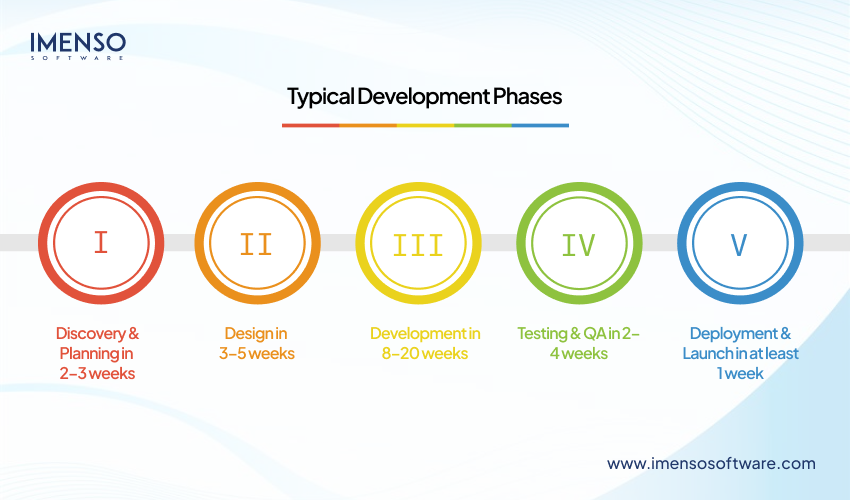
- Discovery & Planning in 2–3 weeks
Define goals, user flows, feature lists, and tech stack - Design in 3–5 weeks
Wireframes, UI mockups, feedback loops - Development in 8–20 weeks
Frontend, backend, integrations, and database setup - Testing & QA in 2–4 weeks
Bug fixes, usability testing, and device testing - Deployment & Launch in at least 1 week
Go live, monitor performance, and onboard early users.
Pro Tips to Speed Things Up
- Start with wireframes before writing a single line of code
- Keep your MVP tight, you can always add features later
- Use tools like ClickUp, Jira, or Trello to manage sprints
- Partner with a team that’s built LMS platforms before
Ways to Optimize LMS Development Costs
Well, you just need to build smart, whether you’re bootstrapping or working with investor money. Here are proven ways to keep your costs lean.
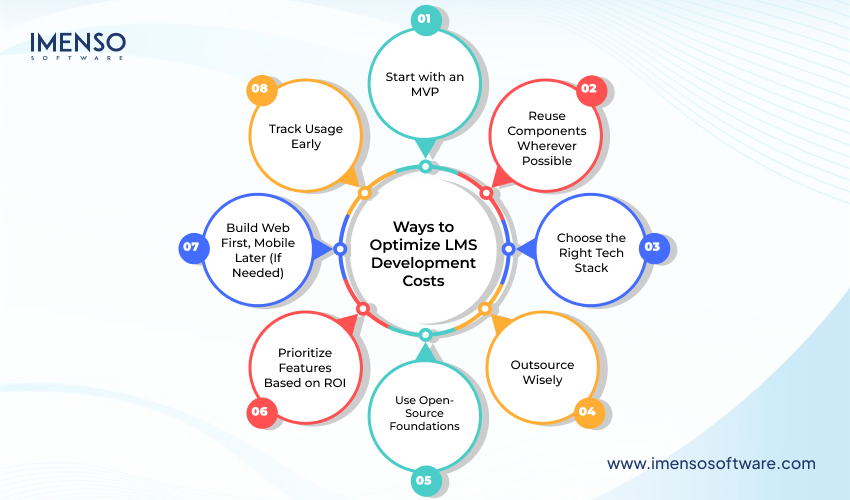
1. Start with an MVP
You don’t need live streaming, AI tutors, and a points-based reward system on day one.
Focus on core features like:
- User Registration
- Course uploads
- Video playback
- Progress tracking
2. Reuse Components Wherever Possible
Use pre-built UI kits or open-source plugins to speed things up.
Example: Use existing quiz modules and calendar pickers or video players.
3. Choose the Right Tech Stack
Pick a stack that’s cost-efficient and scalable. Ex;
- Frontend: React, Vue.js
- Backend: Node.js, Django, Laravel
- Mobile: React Native, Flutter
4. Outsource Wisely
A quality offshore team can reduce your development cost by 50–70% without sacrificing reliability.
Tips:
- Look for EdTech experience
- Ask for past work demos
- Communicate clearly and often
5. Use Open-Source Foundations
Platforms like Moodle and Chamilo offer a strong foundation to build on. They’re great for saving time and budget upfront. Especially when creating LMS solutions for schools or internal teams.
6. Prioritize Features Based on ROI
Do you also find that there is no revenue or improved learning even after having every cool feature?
Ask yourself:
- Will this feature help me acquire more users?
- Will it make students learn better or faster?
- Will it improve retention or reduce churn?
7. Build Web First, Mobile Later (If Needed)
Mobile apps are great, but they can double your development time and budget. Add iOS/Android versions when you’ve hit traction.
8. Track Usage Early
Add analytics from the start to understand what features people use. You’ll save thousands by not building things no one touches.
Case Study: 1 Teachable
Teachable started as a side project by an NYU student frustrated with how hard it was to sell courses online. Instead of overbuilding, the team launched lean — focusing only on three essentials: course creation, payment handling, and student access.
By solving a clear problem for creators — making it easy to launch and monetize courses without any coding — Teachable quickly gained traction. As the platform grew, they added affiliate tools, email marketing, and mobile features based on user demand.
- The lesson?
You don’t need a feature-packed product to win. Focus on solving one real problem better than anyone else, launch with only what matters, and grow from there. So, start small and scale smart because simplicity sells.
Case Study: 2 SkillTree
SkillTree set out to build an AI-powered LMS with everything — smart course recommendations, live classes, certifications, leaderboards, forums, and even a mobile app with offline mode. But there was one problem: they tried to build it all before getting a single user.
After 14 months of development, the product was still unfinished. They hadn’t tested with real learners, burned through their pre-seed budget, and launched nothing of value. When they finally opened beta access, users found the platform overwhelming and confusing.
SkillTree never recovered.
- What went wrong?
They overbuilt, skipped validation, and lost focus on what learners needed.
- Lesson learned:
Don’t chase perfection. Launch lean, test early, and build only what solves a real problem.
Build vs Buy – Which Is Right for You?
One of the first decisions EdTech founders face is whether to build a custom LMS from scratch or buy and customize an existing platform. The right choice depends on your budget, timeline, feature needs, and growth plans.
Build Your LMS
Ideal for startups that want full control, custom features (like AI or gamification), and plan to scale. It offers long-term ROI and flexibility but comes with higher upfront costs, longer timelines, and the need for a solid tech team.
Buy or Customize an Existing LMS
Perfect for early-stage startups testing an idea or launching fast on a budget. Platforms like Moodle, Open edX, or Teachable offer quick setups and lower costs, but you’ll face limitations in customization and scalability.
Quick Tip:
- Need speed and low risk? Buy and customize.
- Want unique features and scale? Build your own.
- Looking for balance? Customize an open-source LMS for faster launch + more control.
Funding and Security: What Every EdTech Startup Must Plan For
Building a learning management system isn’t just about features and design — it’s about how you’ll fund it and how you’ll protect it. These two areas can make or break your LMS before it even reaches its users.
Choosing the Right Funding Path
You have two core options: self-funding or external capital. Each has trade-offs.
- Bootstrapping gives you full control and keeps you focused on revenue with growth can be slower with limited cash.
- Angel or seed rounds provide the capital to build and hire faster, though you’ll give up some equity and report to early investors.
- Series A and beyond allow you to scale fast and expand globally. Invest in marketing and roll out advanced features, but come with higher stakes and board oversight.
If you’re not ready to give away equity, grants and competitions can be a strong option.
Strategic Partnerships That Bring Funding and Users
Startups often overlook partnerships that deliver both capital and early traction.
- Work with content creators to co-develop learning material and share revenue
- Partner with companies who need LMS tools for employee training and pilot your platform with them
- License your product to universities or schools for large-scale campus adoption
These collaborations can bring in upfront cash or guaranteed users — reducing your initial risk significantly.
Build a Financial Roadmap That Makes Sense
Before raising funds, outline your actual needs:
- Calculate your full development and 12-month operations budget — including design, development, marketing, support, and cloud services.
- Break your growth into milestones like MVP launch, reaching your first 1,000 users, or hitting monthly revenue targets.
- Match your funding rounds to these milestones so you’re raising just enough, not too much too soon.
Investors want to see how you’ll turn money into users and users into revenue. A clear go-to-market plan with cost estimates goes a long way.
Security & Compliance: Protect What Matters
If your LMS handles student data, online payments, or is used in schools or healthcare, security isn’t optional — it’s critical. A single breach could cost you user trust and millions in fines.
Security and Compliance Must-Haves
Your LMS will likely store personal and sensitive data. Here’s what you need to stay protected:
- Encrypt all user data during storage and transfer
- Use secure logins, two-factor authentication, and access controls based on roles
- Choose trusted cloud providers and set up daily automated backups
- Install SSL certificates to protect your traffic and prevent attacks
- Schedule regular code reviews, penetration tests, and vulnerability scans
Depending on who your users are, you may need to comply with specific privacy laws
- GDPR
- FERPA
- COPPA
- HIPAA
Ignoring these could lead to major fines and destroy your credibility. But getting compliant early builds trust and makes it easier to sell to schools, universities, and enterprises.
Plan for These Costs Upfront
- Security setup: $3,000 to $10,000
- Cloud hosting and backups: $100 to $500 per month
- Regular audits and scans: $2,000 to $15,000 per year
Funding and security are the two pillars your LMS will stand on. Plan wisely, build responsibly, and you’ll be better prepared to scale, without unexpected risks down the road.
Before You Go,
Building an LMS isn’t just about tech, it’s about creating an engaging, secure, and scalable learning experience your users will love.
Whether you’re bootstrapping a niche course platform or launching the next big EdTech SaaS, knowing your costs, options, and roadmap makes all the difference.
Let’s recap:
Key Takeaways
- MVP LMS cost: $15K – $50K depending on team features
- Full-feature LMS: $80K – $200K+ includes mobile, AI, gamification
- Development time: 2–9 months, depending on complexity
- Ongoing costs: $500 – $5,000/month for cloud, support, updates
- Smart tip: Start lean, validate fast, scale with user feedback
- Don’t skip: Security, compliance, and future-proof planning
Frequently Asked Questions
Q1: Can I build an LMS for under $10,000?
Yes, but only a very basic MVP, likely built using open-source tools like Moodle. Custom development at that price will be extremely limited.
Q2: How long does it take to build a usable LMS?
A basic version can be done in 2 to 3 months. A fully featured LMS (with mobile apps, gamification, and custom dashboards) can take 6–9+ months.
Q3: Should I build from scratch or customize Moodle/Open edX?
If you’re short on time or budget, customizing an open-source LMS is a smart choice. But if you’re building a truly unique product, custom from scratch gives you more freedom and scalability.
Q4: What’s the biggest hidden cost in LMS development?
Post-launch costs like cloud hosting, support, compliance updates, and scaling infrastructure. Budget at least 15–20% of your initial build cost per year for these.
Q5: Can I outsource LMS development safely?
Yes, outsourcing LMS development is safe if you choose an experienced team, set clear goals, sign NDAs, and communicate regularly. It’s a smart, cost-effective choice for many startups.